How to Find Accurate Prayer Times for Your City
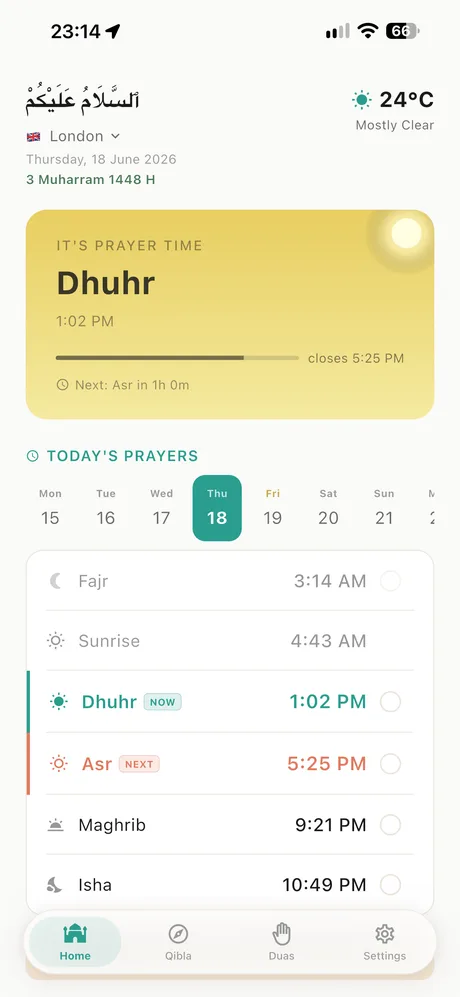
A step-by-step guide to finding reliable Fajr, Dhuhr, Asr, Maghrib and Isha prayer times wherever you are — using Musulman.
Finding prayer times in three steps
Whether you are at home or travelling, accurate Salah times start with one thing: your location. Here is how to get it right.
1. Open the Prayer Times page
Go to Prayer Times on Musulman and type your city name in the search box. Results appear as you type — select your city from the list and your five daily prayers are shown immediately.
The times shown are calculated using coordinates for your city's centre. If you live near a city boundary, the difference from a neighbouring city is usually under a minute for Dhuhr and Asr, though Fajr and Isha can differ by a few minutes.
2. Check the calculation method
Different scholars and regional authorities use different astronomical formulae to determine when Fajr starts and Isha ends. The two main variables are the solar depression angles.
| Method | Fajr angle | Isha angle | Common in |
|---|---|---|---|
| ISNA | 15° | 15° | North America |
| MWL | 18° | 17° | Europe, Far East |
| Karachi | 18° | 18° | South Asia |
| Egyptian | 19.5° | 17.5° | Africa, Middle East |
Musulman defaults to a method appropriate for your region. You can override it in the app under Settings → Calculation method.
3. Save your city
On the Musulman iOS app, your city is remembered automatically. You can add multiple cities — useful when you travel or have family in a different timezone.
Why prayer times change every day
The five prayers are linked to the sun's position. As the Earth tilts through the year, sunrise and sunset shift, dragging all five prayers with them. The difference is small day-to-day but adds up to over an hour across a season.
Fajr is the most variable: in summer it can be before 3 am in northern latitudes, while in winter it falls after 6 am.
Tips for travellers
- Check the city you are travelling to, not your home city. A flight from London to Dubai shifts Dhuhr by nearly three hours.
- For short stays, many scholars say you may follow your destination city's times from arrival.
- For missed prayers, the general ruling is to make them up (qada) as soon as you can, in order.
Get the app
The Musulman iOS app shows your next prayer in a live widget on your Home Screen and Lock Screen — no need to open anything.